Osterloh Guitar Academy
Welcome, [Student Name]! Your Guitar Journey Starts Here!
Getting Started Guide
We're thrilled to have you! This guide covers the essentials for getting set up, understanding how things work at OGA, and taking your first steps.
Your Digital Hub: The Student Portal
Think of the Student Portal as your personal dashboard for everything at OGA. It's where you'll track your progress, manage lessons, access personalized materials, log your practice, and see your achievements.
Watch this quick tour to see how it works: (Highly Recommended!)
How to Log In:
- Go to the Portal: [PORTAL_LOGIN_URL] (Bookmark this!)
- Your Email: Use the email address you registered with.
- Your Password: Click "Forgot Password" on the login page and follow the reset instructions sent to your email to set up your password.
Key Portal Features Overview:
- Overview: Your main dashboard. Set your musical goals here first!
- Skills & Progress: See detailed progress across different guitar skills with interactive heatmaps.
- Classes: View the schedule, book lessons, and see recommended classes based on your level.
- Practice Log: Track your sessions with built-in tools including a metronome and AI-powered practice generator that suggests what to work on!
- Resources: Access videos, PDFs, backing tracks, and learning materials organized by skill level.
- Achievements: Unlock badges and points as you master skills.
- Media: Upload and view your progress photos/videos.
- Messages: Direct messaging with your teacher for questions between lessons.
Your Onboarding Progress
Node Title
Description will appear here
Essential Guitar Setup
Let's get your instrument ready:
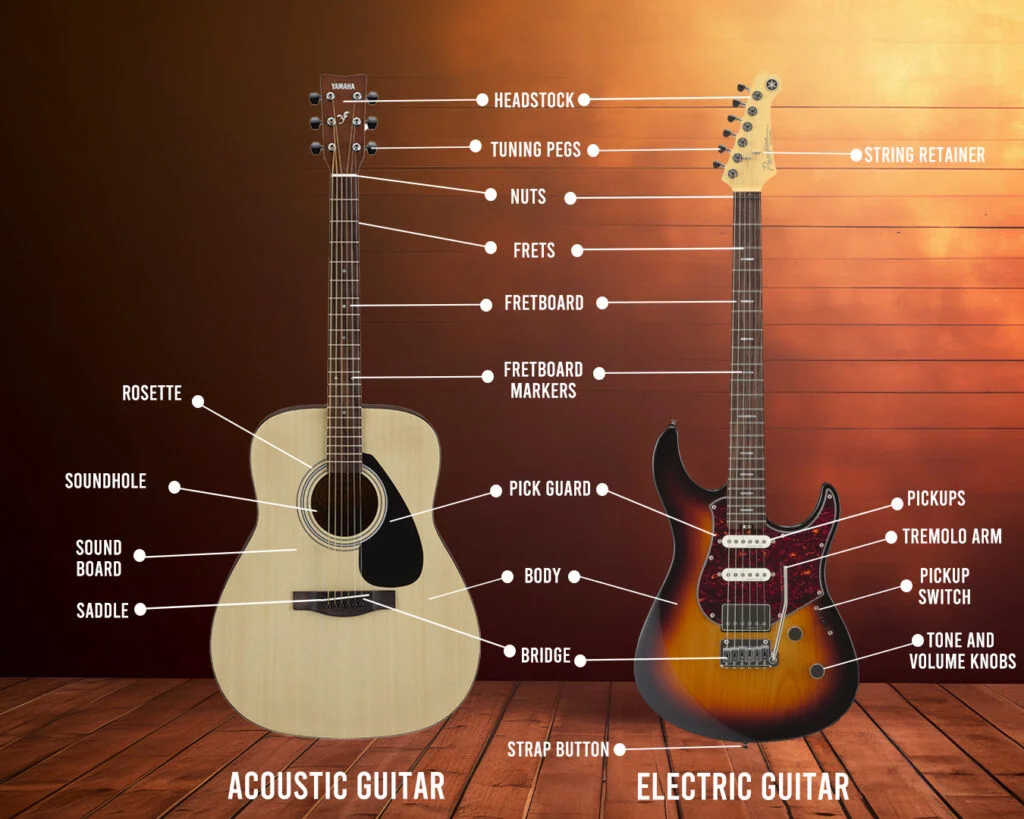
1. Guitar Parts: Knowing the basic parts helps follow instructions.
2. Tuning: Tune to E-A-D-G-B-e (thickest to thinnest string). Use a tuner app (like GuitarTuna) or a clip-on tuner. Accuracy is key!
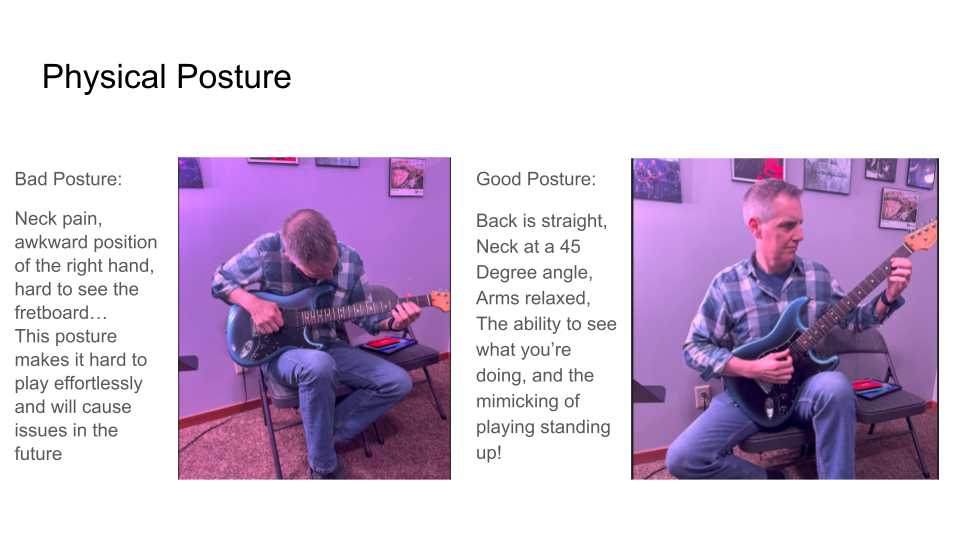
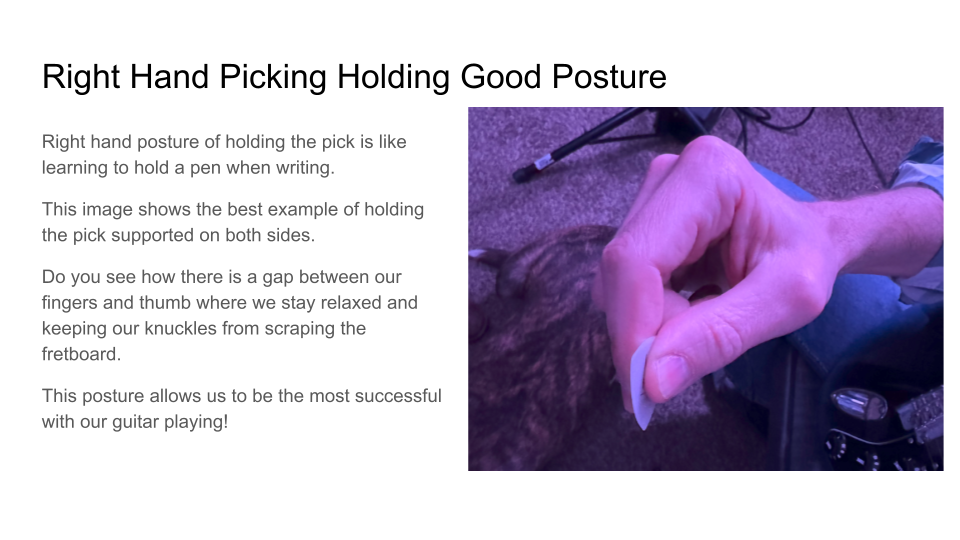
3. Holding the Guitar & Pick: Comfort is important. Sit upright in a chair without arms. Rest the guitar's waist on your leg. Hold the pick firmly but relaxed between your thumb and index finger.
How Learning Works Here
We combine personalized lessons with powerful digital tools:
- Lessons & Classes: Your core learning happens here. You can view available slots and book your lessons/classes via the Classes tab in the Student Portal.
- Workshops: Look out for special workshops on the schedule (also in the portal) for deep dives into specific topics.
- Your Digital "Binder":
- Your instructor may assign specific exercises or notes – check the Portal's Media section.
- General materials, backing tracks, standard exercises, and theory guides are available in the Resources tab within your Student Portal.
- Resources Tab: A collection of videos, PDFs, backing tracks, and learning materials organized by category – all accessible directly within your Student Portal.
The OGA Learning Loop: These steps aren't separate activities – they flow together as one integrated learning experience. As you attend classes and receive feedback, you'll naturally practice and track your progress. The portal connects everything, so your practice logs inform your progress, which shapes your class recommendations. It's all one continuous journey!
OGA Learning Loop
OGA Learning Loop
Hover over any step to learn more. These steps flow together as one integrated experience – your portal connects classes, practice, and progress into a seamless learning journey.
Practice: The Key to Progress
Mastering guitar is built on consistent, smart practice.
Watch this short video on our approach to practice:
Core Principles:
- Consistency is King: Short, regular sessions build skill faster.
- Focus is Key: Prioritize assigned exercises and songs.
- Use Your Tools: Log practice in the portal.
- Warm-Up: Always start with simple finger exercises.
- Listen Carefully: Are notes clear? Is timing steady?
Find more detailed practice strategies in the Practice Article Hub.
Your Immediate Next Steps
Now that you're logged in and familiar with the portal, let's get the ball rolling on your learning:
- Set Your Goals on the 'Overview' tab. (This is your next most important step!)
- Book Your First Lesson/Class! Head to the 'Classes' tab.
After booking, explore the "Beginner Chords" video in the Resources tab of your Student Portal.
Need Help? We're Here!
Learning guitar takes time – be patient with yourself and celebrate every bit of progress! If you hit a snag or have a question, check out these helpful articles:
If you can't find an answer in the articles above, or for any other questions, please contact us at osterlohguitaracademy@gmail.com or call us at 419-584-8636.
Our Academy Information & Policies document has details on scheduling, payments, and cancellations.